We've recently updated our Terms of Service and Privacy Policy.

A trustworthy website is one of the most valuable assets a small business can have. Consumers rely on signals within the digital realm to determine whether a company is legitimate, credible, and safe to engage with. Factors ranging from design quality and transparency to security protocols and content accuracy, every detail contributes to the trust that users place in your brand. In this article, we’ll break down the key elements that influence website credibility, explain how Google evaluates trustworthy sites, and show you how small businesses can build confidence with both customers and search engines.
Online trust determines whether visitors stay on your site, contact your business, or complete a purchase. Trust also affects how your website ranks in search engines, especially as Google continues emphasizing user safety and accuracy through its E-E-A-T standards: Experience, Expertise, Authoritativeness, and Trustworthiness.
A well-designed, high-performing website signals professionalism. Sloppy or outdated websites — the type often highlighted in Common Website Mistakes Small Businesses Make — send the opposite message. Likewise, a smooth, fast, and responsive experience reinforces reliability, which ties directly into How to Improve Website Performance.
Trust is not built from a single element. It’s the result of multiple signals working together to demonstrate that your business is legitimate, competent, and customer-focused.
Google uses E-E-A-T as guidelines to evaluate content quality and website credibility. While not a ranking algorithm by itself, these principles heavily influence how well your pages perform.
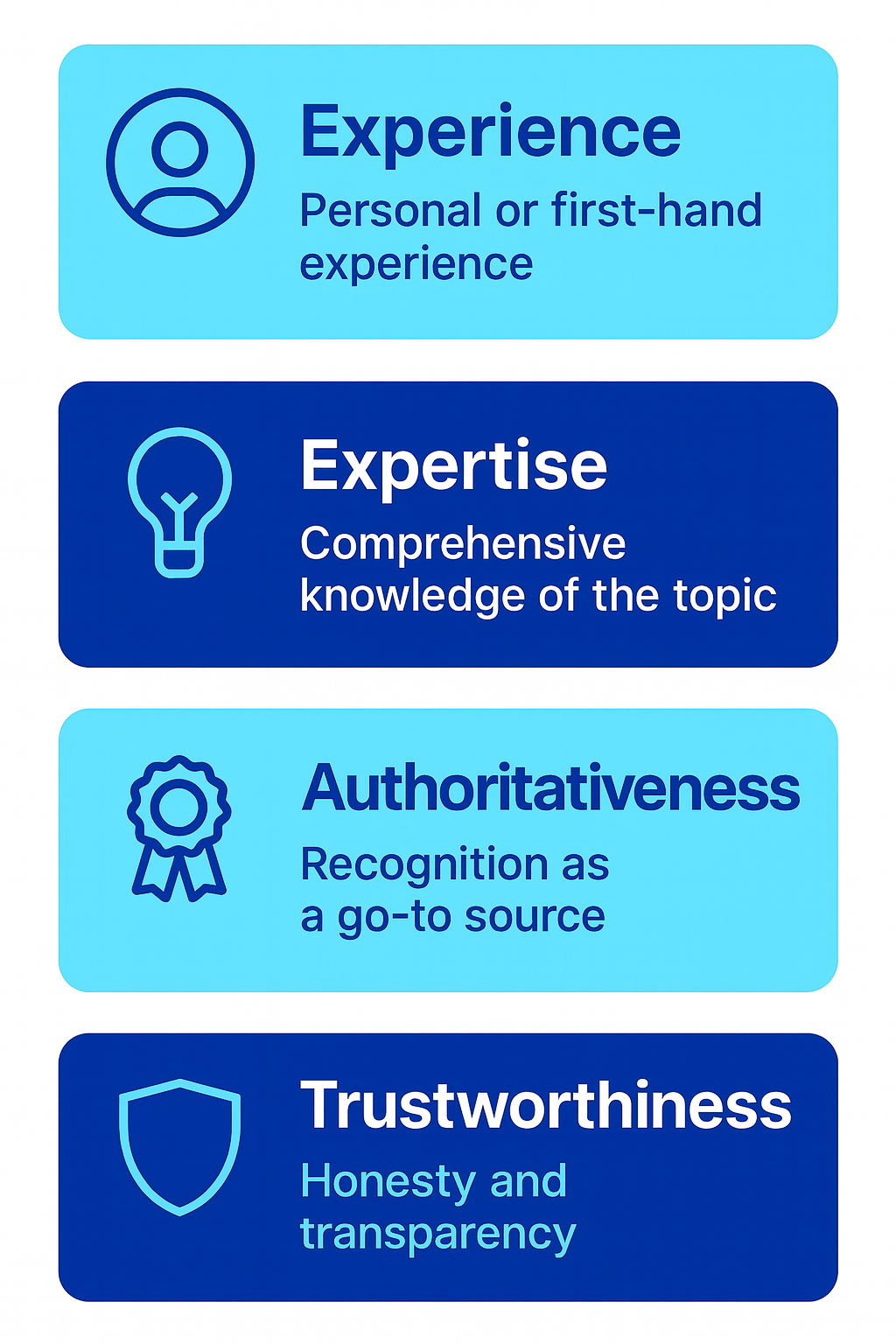
Google wants to see that you have real-world experience with the topic you’re discussing.
Examples:
This refers to demonstrating knowledge and skill in your field.
Examples:
Your brand should be recognized as a reliable source.
Examples:
The foundation of the entire model. Trust comes from:
A trustworthy website must satisfy all four criteria, but trust is the element that influences user behavior the most.
Trust signals are visual or functional indicators that reassure users your business is legitimate. These should be displayed prominently across your site.
A secure connection protects user data and tells visitors your site is safe. Browsers now flag non-HTTPS websites as “Not Secure,” which immediately damages trust.
Every trustworthy site should include:
Lack of contact information is a top credibility red flag.
Show real customer feedback, including:
Social proof reduces perceived risk and supports credibility.
Your About page should explain:
Authenticity builds connection and trust.
Badges from associations, certifications, or partner programs help validate your expertise.

A visually outdated or poorly structured website immediately erodes trust. Modern consumers equate design quality with business legitimacy. The guidance found in Small Business Website Design Tips supports creating a polished, modern experience that users can rely on.
Your design should feel current, not cluttered or inconsistent.
Visitors should be able to find information quickly and intuitively.
Use consistent:
Consistency builds recognition and trust.
Avoid blurry or low-quality stock photos. Use:
Accessibility builds inclusiveness and broadens your audience. Ensure:
Professional design reduces friction and creates confidence.
Performance is not just technical — it affects credibility. Slow loading pages or broken features signal neglect. Users leave quickly, and many assume a slow website means an unreliable business.
This is why improving speed and stability — as outlined in How to Improve Website Performance — plays a critical role in trust.
Key performance factors include:
Aim for under 2.5 seconds for key content.
More than half of users browse from mobile devices, making responsiveness a trust requirement.
Fix:
Implement:
Your technical foundation is a direct reflection of your professionalism.

People trust businesses that communicate clearly. Be upfront about what you offer and how you operate.
If possible, include:
If you have a business where pricing is custom, make it easy for people to get information and quotes quickly.
Explain exactly what customers can expect.
Well-written CTAs guide users without misleading them.
Your privacy policy builds legal and ethical trust. It should explain:
While not required for every site, it adds professionalism and clarifies expectations.
Transparency removes uncertainty and helps customers make informed decisions.
Your content should reflect your experience, industry knowledge, and authority.
Share knowledge through:
Educational content positions you as a trusted resource.
Avoid vague claims or exaggerated promises.
When appropriate, reference data from reputable organizations.
Outdated information lowers trust and relevance.
High-quality content signals both professionalism and integrity.
Trust forms not only from what a website says but how it behaves. User experience includes every interaction visitors have with your site.
Content should be easy to scan, with clear headings and spacing.
Pop-ups should never block essential content or make navigation difficult.
Avoid autoplay videos, flashing animations, or overly aggressive sales language.
Guide users with:
Sites that are confusing or difficult to navigate mimic many of the issues seen in Common Website Mistakes Small Businesses Make.
Trust is reinforced when people outside your business also vouch for your credibility.
If your brand is mentioned in articles, interviews, or local news, highlight it.
Highlight collaborations with reputable companies or organizations.
Explain real results you’ve delivered.
Third-party platforms like Google and Yelp provide unbiased credibility.
Trustworthy websites show signs of care and frequent maintenance.
Remove outdated promotions, update dates, and revise information regularly.
Monitor performance, fix broken features, and update platforms.
A modern appearance is essential for maintaining authority.
Install updates promptly and run routine security scans.
A neglected website quickly sends the message that the business may be neglected as well.
We’ll give you a call to set up time for your team and ours to meet virtually for a personalized demo.
Book a Demo


.png)
%20(1).png)
.svg)
.svg)



.png)
