We've recently updated our Terms of Service and Privacy Policy.

Choosing which website builder is best for a small business can feel overwhelming. With dozens of platforms claiming to be the easiest, cheapest, or most customizable, it’s difficult to know which one will support long-term growth. Your website is more than a digital brochure, it’s the core of your online presence. The platform you choose impacts design flexibility, SEO performance, scalability, and the overall customer experience.

The website builder you select affects your ability to:
Many issues seen in Common Website Mistakes Small Businesses Make stem from choosing a platform that doesn’t match the business’s long-term goals. Likewise, applying the principles in Small Business Website Design Tips becomes much easier when working with a builder that supports modern styling, responsive design, and intuitive layout controls.

This guide evaluates the five most popular and capable platforms for small businesses:
Each platform excels at different things. To keep this guide practical, we’ll compare them using the criteria most important to small business owners.
WordPress.org is the world’s most widely used website platform, offering unmatched flexibility and control. It’s an open-source CMS, which means you can fully customize your site—if you’re willing to manage hosting, plugins, and technical upkeep.
Because WordPress is open-source, it offers:
If you want maximum control or plan to scale aggressively, WordPress is the strongest option.
Plugins like Rank Math and Yoast SEO make optimization straightforward.
Its codebase is SEO-friendly, and advanced customization enables exceptional technical SEO—a major advantage for growth-focused businesses.
You can build:
WordPress grows with you more than any other builder.
Unlike all-in-one builders, you’re responsible for:
This makes WordPress best suited for businesses prepared for technical management or willing to hire help.

Depending on hosting, themes, and plugins, costs can range from modest to substantial. Learn more about budgeting considerations in Average Cost of Website Design for Small Business.
Wix is a user-friendly, drag-and-drop builder designed for simplicity. It’s excellent for small businesses that want speed and ease without technical complexity.
The editor is intuitive and allows:
Wix is ideal for DIY business owners who want to get online quickly.
Wix offers hundreds of professionally designed templates that work well for service businesses, restaurants, events, and creatives.
Includes:
This all-in-one structure minimizes complexity.
While Wix has improved its SEO tools significantly, it still falls short for advanced SEO needs.
Once you choose a template, it cannot be swapped without rebuilding your site.
For large sites or complex functionality, Wix becomes limiting.
Squarespace is known for elegant design, clean layouts, and a refined user experience. It’s popular among creatives, lifestyle brands, and small service businesses.
Squarespace is the industry leader in pre-designed templates. Its aesthetic strength pairs well with branding strategies outlined in Small Business Website Design Tips.
Hosting, security, and updates are fully managed.
Ideal for:
Built-in appointment scheduling and commerce tools make it simple to grow.
You can adjust colors, fonts, and layout blocks, but not deeply customize functionality.
Enough for most businesses, but not exceptional for advanced SEO strategies.
The section-based layout is tidy but less flexible than true drag-and-drop.
Shopify is the best option for small businesses that rely heavily on ecommerce. While it can be used for service-based businesses, its biggest strengths lie in selling products online.
Includes:
Shopify can support:
Thousands of apps expand your store’s functionality.
24/7 customer service, tutorials, and a strong partner ecosystem.
Scaling a Shopify site often requires paid apps, increasing monthly costs.
While possible, Shopify is not ideal for businesses without product sales.
To go beyond basic styling, coding in Shopify’s Liquid language is required.
Webflow is a powerful website builder for businesses wanting custom design without traditional coding. It offers pixel-level control similar to design tools like Figma, making it a top choice for visually driven brands.
You can control:
It’s the most flexible visual builder on this list.
Webflow output is cleaner and faster than most drag-and-drop builders, which improves performance and SEO—key to avoiding Common Website Mistakes Small Businesses Make.
Ideal for:
Most functionality is built-in.
Very powerful but not as beginner-friendly as Wix or Squarespace.
Businesses that only need a few pages may not need Webflow’s advanced features.
Especially when using CMS plans.
Below is a simplified decision matrix comparing key attributes.
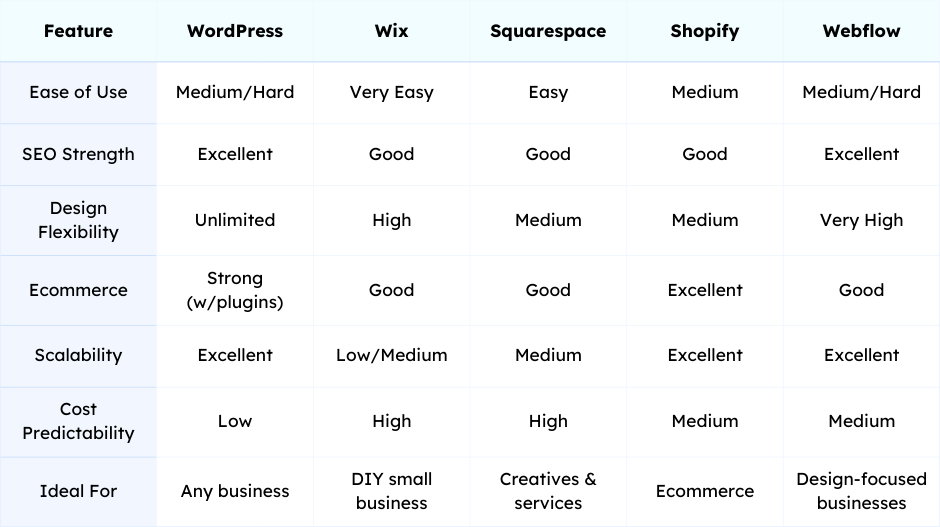
For businesses wanting long-term scalability and control.
For simple, fast, and visually pleasing websites requiring no technical management.
For photographers, designers, boutique services, and modern lifestyle brands.
No other platform matches Shopify for product-based businesses.
For small businesses wanting a unique, high-performing website.

Use the following questions to guide your decision:
Choose WordPress or Webflow.
Choose Wix or Squarespace.
Choose Shopify.
Choose Webflow.
Wix and Squarespace offer predictable pricing, while WordPress costs vary widely. More details can be found in Average Cost of Website Design for Small Business.
The detailed comparison in this guide (covering WordPress, Wix, Squarespace, Shopify, and Webflow) shows that even the "Best Website Builder" requires time, technical skill, and an ongoing commitment to SEO. For the small business owner, that complexity often becomes a barrier.
Levitate steps in not just as a marketing tool, but as a full-service partner that creates and manages your entire website with a singular focus: aligning it with your business goals and current SEO best practices from day one.
With Levitate, you get the custom, high-performance website you need without technical headaches and management demands.
We’ll give you a call to set up time for your team and ours to meet virtually for a personalized demo.
Book a Demo


.png)
%20(1).png)
.svg)
.svg)



.png)
