We've recently updated our Terms of Service and Privacy Policy.

Many businesses serve far more communities than the city where they're physically located.
That's where local SEO gets confusing.
If you work across multiple cities, should every location be mentioned on your website? Should you create separate pages? Can adding more city names help you rank in more places?
The answer isn't as simple as adding more locations to your copy.
City mentions can help search engines understand where your business is relevant, but they are only one piece of a much larger picture. Google also considers factors like proximity, business information, reviews, website content, and overall trust when determining which businesses appear in local search results.
Understanding how these pieces work together can help you make smarter decisions about your website and set realistic expectations for visibility across your service area.
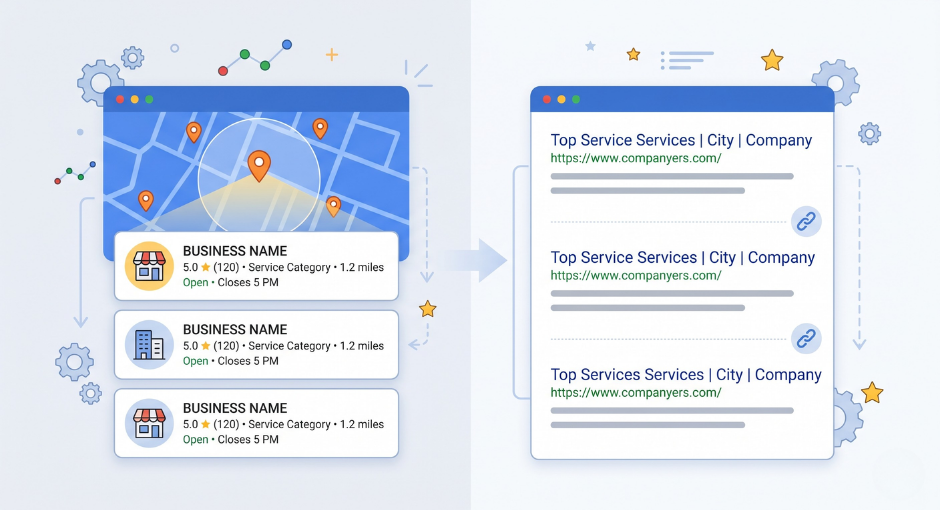
When someone searches for a service, Google is trying to determine two things:
The first question is usually straightforward. If you're a plumber, attorney, financial advisor, or HVAC contractor, your website likely explains what you do.
The second question is where location signals become important.
If your website never mentions the areas you serve, Google has fewer clues about where your business operates. That's why service areas, city names, location pages, Google Business Profile information, reviews, and other local signals all play a role in local search visibility.
City mentions help provide context. They tell search engines, "These are the communities connected to this business."
That doesn't mean every page needs a long list of towns. It means your website should clearly communicate where your services are available.
For a broader look at how search engines evaluate websites today, our guide to SEO for business owners covers the fundamentals in plain language.
One of the biggest misconceptions in local SEO is that more city names automatically lead to better rankings.
Business owners sometimes assume that if mentioning five cities is good, mentioning fifty must be even better.
Unfortunately, that's not how local search works.
Google has become very good at identifying content written primarily for search engines instead of people. Pages stuffed with city names often provide little useful information and rarely create a better experience for visitors.
Consider these two examples:
"We provide roofing services."
"We provide roofing services throughout Richmond, Chesterfield, Midlothian, and surrounding communities, including roof repairs, replacements, and storm damage restoration."
The second example gives useful context. It naturally explains both the service and the service area.
Now compare that to a page that simply lists dozens of cities with no additional information. The location names are present, but they don't add much value.
The difference isn't the number of cities mentioned. It's whether the location information helps explain the business.
This is where many local SEO conversations become confusing.
Business owners often see competitors ranking in neighboring cities and assume the reason is simply because those city names appear on their website.
Sometimes that's part of the equation. Often, it's not the biggest factor.
Businesses that perform well across a region typically have multiple local signals working together:
City mentions support these efforts, but they rarely drive results by themselves.
Think of location references as supporting evidence rather than the entire case.
One of the hardest realities of local SEO is that serving an area and ranking in that area are not always the same thing.
A company may happily work with customers thirty miles away and still struggle to appear prominently in search results there.
That's because Google's local ranking systems place significant importance on proximity.
When someone searches for a service, Google often prioritizes businesses that are geographically close to the searcher. Even a highly reputable company can face challenges appearing in local results far outside its primary market.
This is one reason businesses often rank strongest near their office and see visibility gradually decrease farther away.
We explore this concept in more detail in our article on why you can’t rank in every city you serve.
Another common question is whether every city deserves its own page.
Sometimes the answer is yes.
Sometimes it's unnecessary.
Location pages tend to work best when there is meaningful information to include.
For example:
A useful location page helps a visitor understand how your business serves that specific area.
A page that simply swaps one city name for another usually offers very little value.
The objective should be creating genuinely useful local content, not creating pages simply to increase page count.
Many business owners search for their company and notice something strange.
They appear in Google Maps but not in the traditional search results.
Or they rank well organically but struggle to appear in the map section.
This happens because Google uses different ranking systems for different search features.
The Map Pack relies heavily on local signals like proximity, reviews, and Google Business Profile optimization. Organic results evaluate a broader range of website and content factors.
As a result, a business may perform differently across each section of Google.
If you've noticed this behavior, our article on Google Maps versus organic search results explains why those differences occur.
Location names matter.
But they are rarely the strongest signal on a website.
What often carries more weight is information that only your business can provide.
Real project examples.
Customer experiences.
Local knowledge.
Frequently asked questions based on actual conversations with clients.
Insights gathered from years of working in a particular market.
This type of content helps visitors trust your business and gives search engines stronger evidence that you're genuinely connected to the communities you serve.
That's one reason Google's emphasis on expertise and credibility has continued to grow over time.
Our article on real-world expertise in SEO explains why businesses that share firsthand experience often have an advantage over generic content.

Local SEO works best when multiple signals point in the same direction.
Your website helps explain what you do and where you do it.
Your Google Business Profile reinforces your location information.
Reviews provide additional geographic relevance.
Customer experiences demonstrate expertise.
External references help validate your presence in the market.
When these elements align, search engines gain confidence about where your business is relevant.
For a deeper look at how these factors interact, read our article on how local rankings work.
Yes—but probably not as many as you think.
Location references help search engines understand your service area. They help potential customers quickly confirm that you work in their community. They provide useful context when incorporated naturally into your content.
What they don't do is guarantee rankings in every city you serve.
The businesses that perform best in local search typically combine clear service-area information with strong content, customer trust, local relevance, and a consistent online presence.
City names are part of the story. They just aren't the entire strategy.
Local SEO is often less about finding a secret tactic and more about making sure your website clearly communicates who you help, what you do, and where you do it.
At Levitate, we help businesses build websites that support long-term visibility by combining strong content, clear service-area messaging, and a better customer experience. Learn more about our website platform here.
If you're evaluating your current website or wondering whether your service-area strategy is helping or hurting your visibility, we're happy to share what we've learned from working with businesses across a wide range of industries. Book a demo with our team to learn more.
We’ll give you a call to set up time for your team and ours to meet virtually for a personalized demo.
Book a Demo


.png)
%20(1).png)
.svg)
.svg)