
How Can a Small Business Improve Its Google Visibility?
April 6, 2026 · Updated November 5, 2026


Marketing Specialist
To improve your Google visibility, start with a complete, verified Google Business Profile. Then earn a steady flow of reviews and reply to every one. Back that up with a clear website and the same business name, address, and phone number everywhere you're listed.
How does Google decide which local businesses to show?
Google says local results are based mainly on three things:
- Relevance: how well your profile matches what someone searched for.
- Distance: how far your business is from the person searching.
- Prominence: how well known your business is, based on things like your reviews, your ratings, and how many websites link to you.
You can't move closer to every searcher, but you can make your profile more relevant and your business more prominent. Google also says there's no way to pay for a better local ranking, so this work matters even if you run ads.
Being local is an advantage here. Big national brands have name recognition, but when someone searches "accountant near me" or "dentist in [your town]," Google wants to show nearby businesses that fit.
How do I set up a complete Google Business Profile?
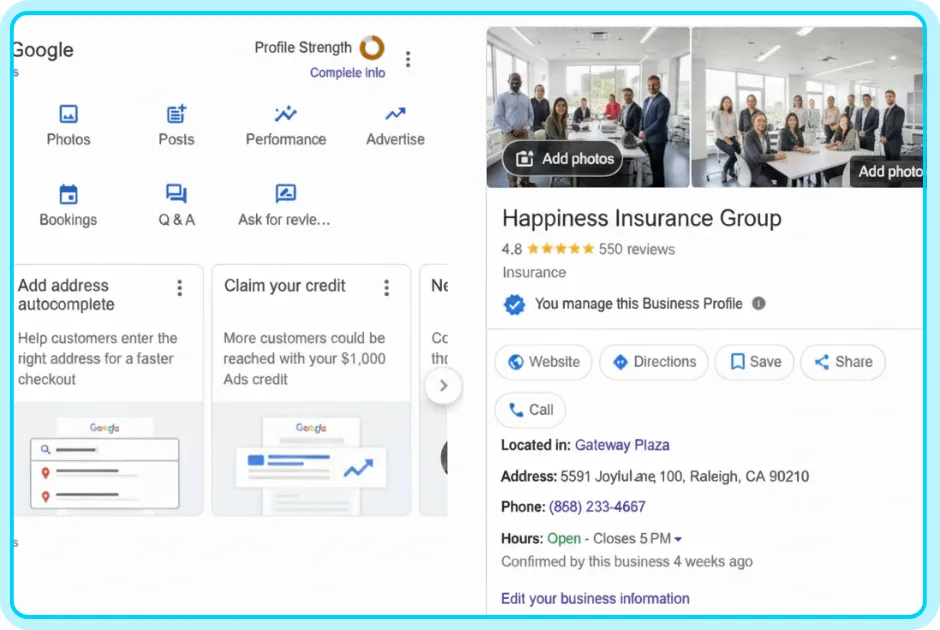
Your Google Business Profile is the listing people see on Google Search and Google Maps. If you don't have one yet, start with our step-by-step guide to setting up your Google Business Profile. Then fill in every section:
- Verify your business. Google says verified businesses are more likely to show up in search results.
- Choose the most specific main category, then add others for the other services you offer.
- Add your hours, including holiday hours.
- Add your phone number, website, and address or service area.
- List your services in the words clients actually use.
- Write a short description of who you help and how.
- Upload real photos of your office, your team, and your work.
Use your real business name only. Adding keywords or city names that aren't part of your name goes against Google's guidelines and can put your profile at risk.
How do Google reviews help my visibility?
Reviews help in two ways. Google says more reviews and positive ratings can help your local ranking. And people read them: in a 2026 survey of 1,002 U.S. adults, 97% of consumers said they read reviews for local businesses.
Recency and volume both count. The same survey found that 74% of consumers only care about reviews from the last three months, and 47% won't use a business with fewer than 20 reviews. A few new reviews every month does more than a burst once a year.
How do I ask for a review?
Just ask. Most people are willing: 94% of consumers in that survey said they're open to writing a review.
Keep the request short and personal. Thank the person for something specific, tell them why it helps, and include your review link. For example:
"Thanks again for trusting us with your [project]. If you have a minute, a quick Google review would mean a lot to us and helps other people find us. Here's the link: [your review link]"
Don't offer anything in return, and don't tell people what to write. For more wording ideas, see our guide on how to ask for a review the right way.
Should I reply to every review?
Yes. Google says replying shows customers you value their feedback, and 89% of consumers expect owners to respond. Make each reply personal, because generic, copy-paste replies make 50% of consumers less likely to choose a business.
If you work in health care, never confirm that a reviewer is a patient, even if they shared details first. If you're a financial advisor, check your compliance rules before you reply to or share reviews.
Do Google Business Profile posts help?
Posts let you share updates, offers, and events right on your profile. Google doesn't list posts as a ranking factor, but an active profile tells searchers you're open and paying attention.
Keep it simple. A post every couple of weeks is plenty: a seasonal reminder, an upcoming event, a change in hours, or a quick tip.
How does my website help me show up on Google?
Google reads your website to understand what you offer and where you work. It's also where people go to learn more: 54% of consumers visit a business's website after reading positive reviews.
Make sure your site includes:
- The same contact info as your Google profile
- A clear page for each main service
- Location or service area pages if you serve more than one area
- Answers to questions clients ask you, like "How often should I review my insurance?" or "When should I reseed my lawn?"
- A layout that works well on a phone
For more, read what makes a website trustworthy.

Why does consistent business information matter?
Your business name, address, and phone number should match everywhere: your website, your Google profile, your social pages, and any directories or review sites you're listed on. Mismatched details can confuse Google and the people trying to reach you.
Check your listings a few times a year, and fix anything that's out of date. Anyone can suggest edits to a Google listing, so it's worth watching for changes you didn't make.
How do I show up in AI search results too?
More people now ask AI tools for recommendations. In the same survey, 45% of consumers said they use AI tools like ChatGPT for local business recommendations, up from 6% the year before.
These tools pull from business listings, reviews, and websites, so the steps above help here too. Keep your info accurate everywhere, keep reviews coming in, and make sure your website answers common questions in plain language.
Your reviews also shape the AI summaries people see. The survey found 82% of consumers read AI-generated review summaries, so the themes that show up again and again in your reviews matter.
How can I check how my business shows up on Google?
Try these quick checks once a month:
- Search your business name, then search your main service plus your town. Use a private browser window on your phone.
- Look yourself up on Google Maps.
- Open your Business Profile and review your performance insights to see how people find and interact with your listing.
- Ask an AI tool to recommend a business like yours in your area and see if you come up.
How can Levitate help you keep reviews coming in?
Of everything on this list, a steady flow of fresh reviews is the hardest to keep up with. Levitate's Google Reviews feature makes it easy to ask happy clients for reviews, drafts replies in your voice, and turns your best reviews into social posts. Book a quick demo to see how it works.
Frequently asked questions
Can I pay Google to rank higher in local results?
No. Google says there's no way to request or pay for a better local ranking. Ads show up separately and are labeled as sponsored.
How many Google reviews does my business need?
There's no magic number, but 47% of consumers won't use a business with fewer than 20 reviews. Recent reviews matter just as much, so aim for a few new ones each month.
Do I need a website if I have a Google Business Profile?
Yes. Your profile gets you found, and your website helps people decide. More than half of consumers visit a business's website after reading positive reviews.
How long does it take to improve my Google visibility?
It varies. Completing and verifying your profile can help soon after you make changes. Reviews and website content build up over months, so steady effort matters most.
Does my Google Business Profile affect AI search?
It can. AI tools pull from business listings, reviews, and websites, so accurate, complete info on Google helps them describe your business correctly.