
How to Set Up Your Google Business Profile (and Why It Matters)
April 2, 2026 · Updated October 30, 2026

Director of Digital Marketing
A Google Business Profile is the free listing that shows your business on Google Search and Google Maps, with your hours, phone number, reviews, and directions. To set one up, go to google.com/business, claim or create your listing, pick a category, add your contact details, and verify that you own the business. Then keep it current and keep reviews coming in, because that's what helps you show up and earn trust.
What is a Google Business Profile?
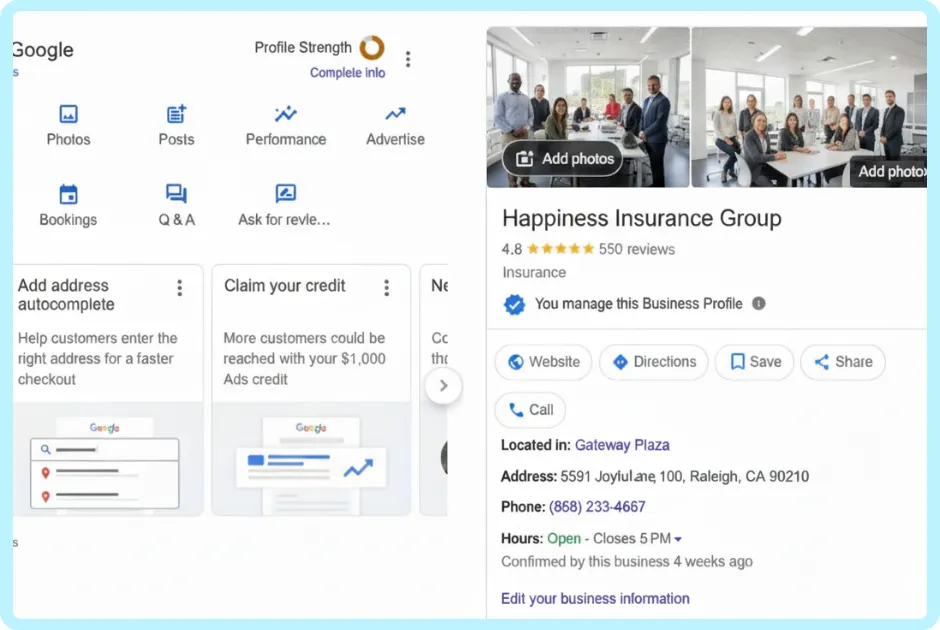
Your Google Business Profile (formerly Google My Business) is the box that appears when someone searches your business name, and the listing people see on Google Maps. For many people, it's the first thing they see about you, before your website and before they ever call.
From your profile, people can:
- Call you
- Get directions to your office
- See your hours
- Read reviews and see your star rating
- Visit your website, or book an appointment if you add a booking link
- See photos of your office and team
Why does a Google Business Profile matter?
People check you out before they reach out. In a 2026 survey of 1,002 U.S. consumers, 97% said they read reviews for local businesses, and Google was still the site they used most to find them.
A complete profile also helps you show up in the first place. Google says local results are based mainly on relevance, distance, and prominence, and that your review count and star rating factor into local ranking. Complete details help with relevance. Reviews help with prominence. For a deeper look, see how local rankings actually work.
There's a newer reason, too. The same survey found that 45% of consumers now use AI tools like ChatGPT for local business recommendations, up from 6% the year before. Those tools pull from listings and reviews across the web, so accurate info on Google helps them describe you correctly.
When your profile is complete and current, it builds trust before the first conversation. When it's blank or out of date, people often move on to the next name on the list.
How do I set up a Google Business Profile?
Setup is free and takes about 10 to 15 minutes. Have your business name, address or service area, phone number, website, and hours ready.
- Sign in at google.com/business. Use a Google account you'll keep for the long haul, ideally tied to your business email, not one you might lose access to.
- Search for your business. Google may already have a listing for you, built from public info. If it shows up, claim it. If it doesn't, create a new one. If someone else already manages it, you can request access.
- Enter your business name exactly as clients know it. Match your sign, website, and marketing. Don't add keywords or city names that aren't part of your real name. Google's guidelines don't allow it, and it can put your profile at risk.
- Choose your main category. Pick the most specific one that fits, like "Insurance agency," "Financial planner," "Dentist," or "Plumber." You can add more categories later for other services you offer.
- Add your location or service area. If clients visit your office, add the address so they can get directions. If you work from home or go to your clients, you can hide your address and list the areas you serve instead.
- Add your phone number and website. Use a number someone answers during business hours.
- Verify your business. More on this below.
- Finish your profile. Add your hours, a short description, your services, and photos.
How do I verify my Google Business Profile?
Verification proves you own the business, and you can't edit your info until it's done. Google decides which verification methods you get based on things like your business category, public info, and region, and you can't change the options it offers. They can include:
- A phone call or text with a code
- An email with a code
- A short video recording of your business
- A live video call with Google support
- A postcard by mail
Some businesses need more than one method. If you get video, read Google's instructions before you hit record. You'll need to show where you work and proof that you manage the business.
Before you start, make sure your business name, address, and phone number match what's on your website and other listings. Mismatched details are a common reason verification fails.
What should I add after my profile is live?
A bare profile beats no profile, but a complete one works harder for you.
- Photos: your office, your team, and you. A friendly headshot helps people put a face to the name.
- Business description: a few plain sentences on who you help and how.
- Services: the main things you do, in the words clients use.
- Hours, including holiday hours: nothing frustrates people like a locked door.
- Updates: a quick tip, an event, or a seasonal reminder now and then.
- Your review link: copy it from your profile so you can share it with clients.
How do I keep my Google Business Profile up to date?
Check your profile once a month. Make sure your hours, phone number, and services are right, and set holiday hours ahead of time. Add a new photo or update when something changes.
It's also worth watching for edits you didn't make. Anyone can suggest changes to a listing, and Google sometimes updates info on its own. A quick monthly check keeps surprises off your profile.
How do I get more Google reviews?
Ask. Most people are happy to help when you make it easy. The same survey found that 78% of consumers were asked to leave a review in the past year, and 83% of those asked followed through.
Steady beats sporadic. It also found that 74% of consumers only pay attention to reviews from the last three months, so a few new reviews each month count for more than a burst every couple of years.
Simple ways to ask:
- Send a short, personal email after you wrap up a project, a policy review, or an appointment, and include your review link.
- Ask in person when a client thanks you, then follow up with the link.
- Add the link to your email signature.
Never pay for reviews or offer anything in return. Google's policies don't allow it, and the FTC's rule on consumer reviews bans offering incentives for reviews that express a particular sentiment, positive or negative. For wording that feels natural, see our guide on how to ask for a review the right way.
How should I respond to Google reviews?
Reply to every review, good and bad. In that same survey, 89% of consumers said they expect business owners to respond, and most expect a reply within a week. Keep each reply personal. A copy-paste "Thanks for the review!" can do more harm than good.
- Positive reviews: thank the person by name and mention something specific.
- Negative reviews: stay calm, own what you can, and invite them to talk offline. Our guide on how to respond to negative reviews walks you through it.
What should regulated businesses watch out for?
- Health practices: Never confirm that a reviewer is a patient or mention anything about their care, even if they shared details first. HIPAA still applies. Keep replies general and move the conversation offline.
- Financial advisors: Your firm's compliance rules may cover how you ask for, reply to, and share reviews. Check with your compliance team first.
- Funeral homes: Give families time before you ask for a review, and keep the request gentle and optional.
How do I keep up with reviews without it taking over my week?
The hard part of a Google Business Profile isn't setup. It's keeping up: replying quickly, asking at the right time, and getting more out of the reviews you earn. Levitate connects to your Google Business Profile, so you get an email when new reviews come in and can reply right from Levitate with an AI-suggested response that posts back to Google. You can also turn a great review into a social post in a few clicks. Book a demo to see it in action.
Frequently asked questions
Is a Google Business Profile free?
Yes. Creating, verifying, and managing your profile costs nothing. Google sells ads separately, but you don't need them to have a profile.
Is Google Business Profile the same as Google My Business?
Yes. Google My Business is the old name for the same free listing.
Can I create a profile if I work from home?
Yes. Set it up as a service-area business, hide your home address, and list the cities or zip codes you serve.
How long does verification take?
It depends on the method Google offers you. Phone, text, and email codes can work in minutes, while video reviews and mailed postcards take longer.
Do I still need a website if I have a Google Business Profile?
It's a smart idea. Many people visit your website after reading your reviews to learn more before they call, so your profile and website work best together.